
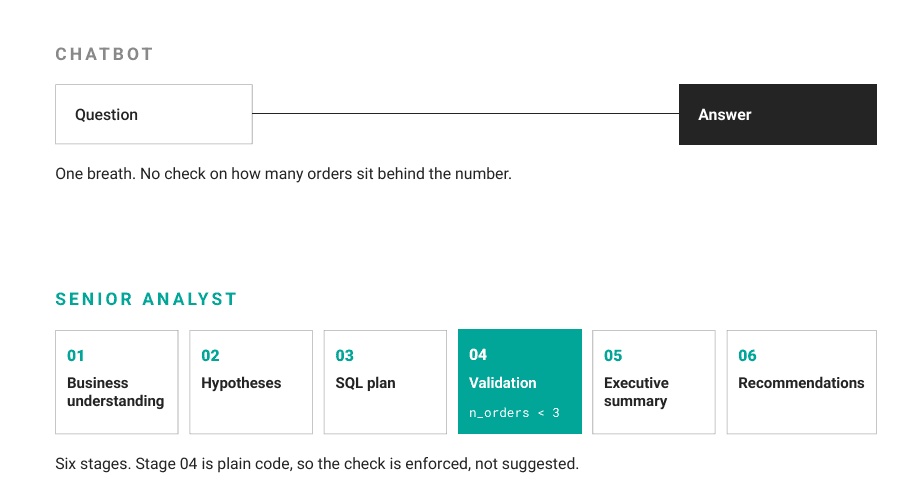
Ask a chatbot “which promotion should we run more of,” and it answers in one breath. It picks a number, states it with confidence, and stops. It picks the promotion with the best-looking number and states its choice confidently. But it may never check how much data that number is based on. A promotion that looks great after 10 orders is much less convincing than one that performs well across 1,000 orders.
A senior analyst works slower on purpose. They restate the question, form a hypothesis, write the query, then check whether the result has enough data behind it before they say anything to an executive.
We can build that discipline into code.
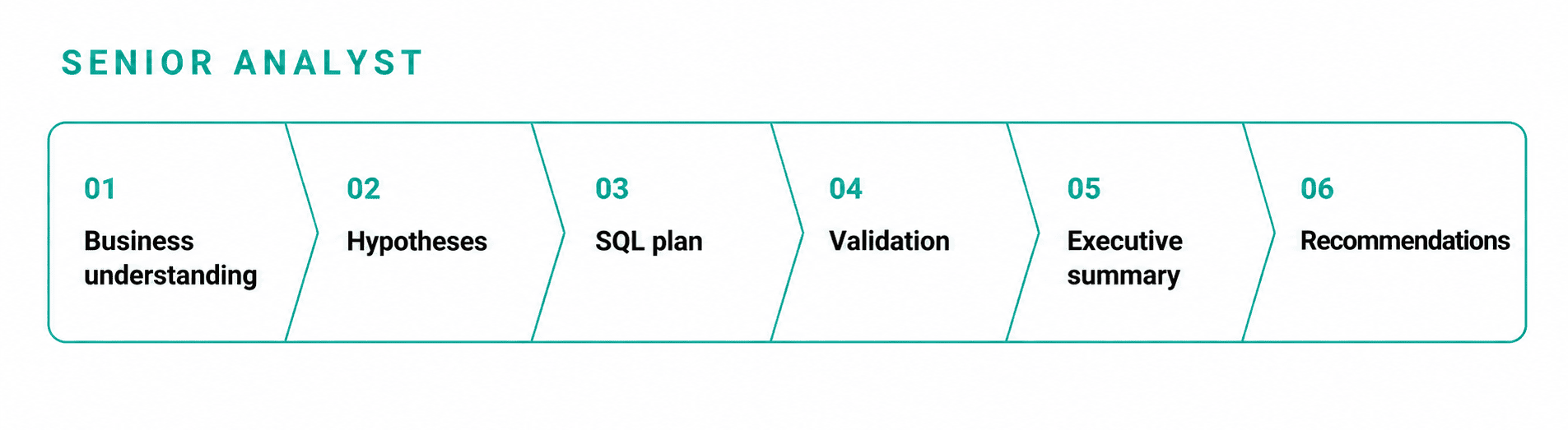
In this walkthrough, we build a small Python toolkit that pushes a question through six stages instead of one prompt: business understanding, hypothesis generation, SQL planning, validation, an executive summary, and recommendations.
The toolkit works with either the Anthropic or the OpenAI API, so you bring your own key. Point it at any table, and it runs the same six stages.
All the code below runs in order, from loading the CSV to the final recommendation, so you can follow along in a notebook against your own data.
Contents
The Data
In this article, we are going to use a data table called online_orders.csv. You can check out this dataset in this StrataScratch interview question. It contains 29 rows of order-level data: which product sold, which promotion applied, the per-unit cost, the customer, the date, and the units sold.
| product_id | promotion_id | cost_in_dollars | customer_id | date_sold | units_sold |
|---|---|---|---|---|---|
| 1 | 1 | 2 | 1 | 2022-04-01 | 4 |
| 3 | 3 | 6 | 3 | 2022-05-24 | 6 |
| 1 | 2 | 2 | 10 | 2022-05-01 | 3 |
| 1 | 2 | 3 | 2 | 2022-05-01 | 9 |
| … | … | … | … | … | … |
| 5 | 2 | 8 | 15 | 2022-05-01 | 2 |
First, we load it with Pandas:
import pandas as pd
from IPython.display import display
orders = pd.read_csv("online_orders.csv")
print(f"Loaded {len(orders):,} rows and {len(orders.columns)} columns.")
display(orders.head())
Output
Loaded 29 rows and 6 columns.29 orders across 3 months, 4 promotions, and 11 products. That is small enough that every group in a groupby matters, which is exactly the kind of dataset a fast answer gets wrong.
Inspecting the Schema
Before touching any large language model (LLM), we look at what is actually in the table:
schema_preview = pd.DataFrame({
    "column": orders.columns,
    "dtype": orders.dtypes.astype(str).values,
    "missing_values": orders.isna().sum().values,
})
display(schema_preview)
Output
| column | dtype | missing_values |
|---|---|---|
| product_id | int64 | 0 |
| promotion_id | int64 | 0 |
| cost_in_dollars | int64 | 0 |
| customer_id | int64 | 0 |
| date_sold | object | 0 |
| units_sold | int64 | 0 |
No missing values, and date_sold is stored as text rather than a real date.
A Deterministic Sanity Check
Before we call any LLM, plain SQL already tells us something. We register the dataframe with DuckDB, which lets us run real SQL against it with no database server to set up.
import duckdb
con = duckdb.connect()
con.register("online_orders", orders)
preview = con.execute("""
    SELECT
        promotion_id,
        COUNT(*) AS n_orders,
        SUM(units_sold) AS total_units,
        SUM(cost_in_dollars * units_sold) AS total_revenue,
        ROUND(AVG(units_sold), 2) AS avg_units_per_order
    FROM online_orders
    GROUP BY promotion_id
    ORDER BY avg_units_per_order DESC
""").df()
display(preview)
Output
| promotion_id | n_orders | total_units | total_revenue | avg_units_per_order |
|---|---|---|---|---|
| 4 | 1 | 8.0 | 64.0 | 8.00 |
| 1 | 12 | 77.0 | 407.0 | 6.42 |
| 2 | 10 | 55.0 | 199.0 | 5.50 |
| 3 | 6 | 31.0 | 185.0 | 5.17 |
Sorted by average units per order, promotion 4 comes out on top at 8.00.
It also has exactly 1 order behind it. A “which promotion has the best average” answer, asked and answered in one breath, would recommend promotion 4 on the strength of a single order. That is the trap the rest of this pipeline is built to catch.
The LLM Wrapper
The pipeline should not care whether you hand it an Anthropic client or an OpenAI client. A thin wrapper takes the provider explicitly and calls the matching method. For Anthropic, a reply can come back as more than one content block, so it scans them for the first block of type text instead of assuming it comes first.
class LLMClient:
    def __init__(self, client, model, provider):
        self.client = client
        self.model = model
        self.provider = provider

    def complete(self, prompt):
        if self.provider == "anthropic":
            response = self.client.messages.create(
                model=self.model,
                max_tokens=1024,
                messages=[{"role": "user", "content": prompt}],
            )

            for block in response.content:
                if block.type == "text":
                    return block.text

            raise ValueError("No text block found in Claude's response.")

        if self.provider == "openai":
            response = self.client.chat.completions.create(
                model=self.model,
                messages=[{"role": "user", "content": prompt}],
            )
            return response.choices[0].message.content

        raise ValueError(f"Unsupported provider: {self.provider}")
This gives the rest of the pipeline a single complete() method to work with. The provider-specific response formats stay hidden inside the wrapper, so later stages do not need separate Anthropic and OpenAI code paths. If a provider is unsupported, or Claude returns no usable text block, the wrapper fails explicitly instead of silently passing an invalid response downstream.
Every stage below asks the model to return JSON, so we need one more helper to pull that JSON out of a text reply. Some replies come back wrapped in a triple-backtick code fence, so the helper strips that first, then falls back to scanning the text for the first valid JSON object or array.
import json
import re
def parse_json(text):
    text = text.strip()

    if text.startswith("```"):
        text = re.sub(r"^```(?:json)?s*", "", text, flags=re.IGNORECASE)
        text = re.sub(r"s*```$", "", text)

    try:
        return json.loads(text)
    except json.JSONDecodeError:
        pass
    candidates = []
    object_match = re.search(r"{.*}", text, re.DOTALL)
    array_match = re.search(r"[.*]", text, re.DOTALL)
    if object_match:
        candidates.append(object_match)
    if array_match:
        candidates.append(array_match)
    candidates.sort(key=lambda match: match.start())
    for match in candidates:
        try:
            return json.loads(match.group(0))
        except json.JSONDecodeError:
            continue
    raise ValueError(f"No valid JSON found in model output:n{text}")
The parser starts with the simplest case: if the entire reply is valid JSON, it returns it immediately. If that fails, it looks for an object or array embedded in surrounding prose and tries the candidates in the order they appear. This makes the pipeline a little more tolerant of common model formatting mistakes while still raising an error when there is no valid JSON to work with.
Stage 1: Business Understanding
The first stage restates the question in terms the table can actually answer, names the grain of the data, and lists limitations before any analysis starts.
class SeniorAnalyst:
    MIN_SUPPORT = 3  # minimum orders behind a group before we trust it

    def __init__(self, llm, table_name, dataframe):
        self.llm = llm
        self.table_name = table_name
        self.con = duckdb.connect()
        self.con.register(table_name, dataframe)
        self.schema = self.con.execute(f"DESCRIBE {table_name}").df()

    def understand_business_context(self, question):
        row_count = self.con.execute(
            f"SELECT COUNT(*) FROM {self.table_name}"
        ).fetchone()[0]

        columns = self.schema[
            ["column_name", "column_type"]
        ].to_dict("records")
        prompt = f"""You are a senior data analyst. A stakeholder asked: "{question}"
Table: {self.table_name}
Columns: {columns}
Row count: {row_count}

Restate the stakeholder question in terms this table can actually answer.

Also name the grain of the table (what one row represents), and list any
limitations you can already see: sample size, date coverage, missing
dimensions, missing context.

Return JSON only: {{"restated_question": "...", "grain": "...",
"limitations": ["...", "..."]}}"""
        context = parse_json(self.llm.complete(prompt))
        self.context = context
        return context
We ran this with claude-sonnet-5 on the question “which promotion should we run more of.” Here is what came back.
Output
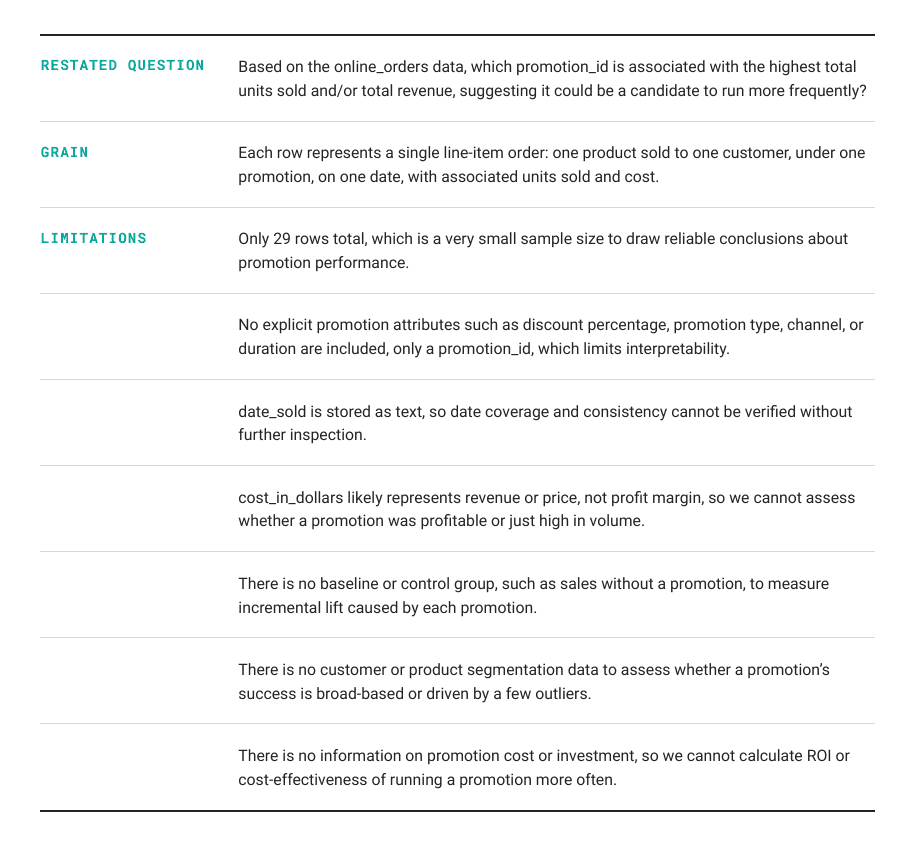
It flagged the small sample size before running a single query — the same trap the plain SQL groupby above already showed us. That flag is a hint, not a check. The pipeline still needs to enforce it in code, which is what the validation stage below does.
Stage 2: Hypothesis Generation
The second stage proposes specific, testable hypotheses using only the columns that exist in the table.
def generate_hypotheses(self, n=2):
    columns = list(self.schema["column_name"])
    prompt = f"""Business context: {self.context}
Propose {n} specific, testable hypotheses that would help answer the
restated question, using only columns in: {columns}.
Each hypothesis should be something we can test using SQL.
Return JSON only: [{{"hypothesis": "...", "why": "..."}}, ...]"""
    hypotheses = parse_json(self.llm.complete(prompt))
    self.hypotheses = hypotheses
    return hypotheses
Output
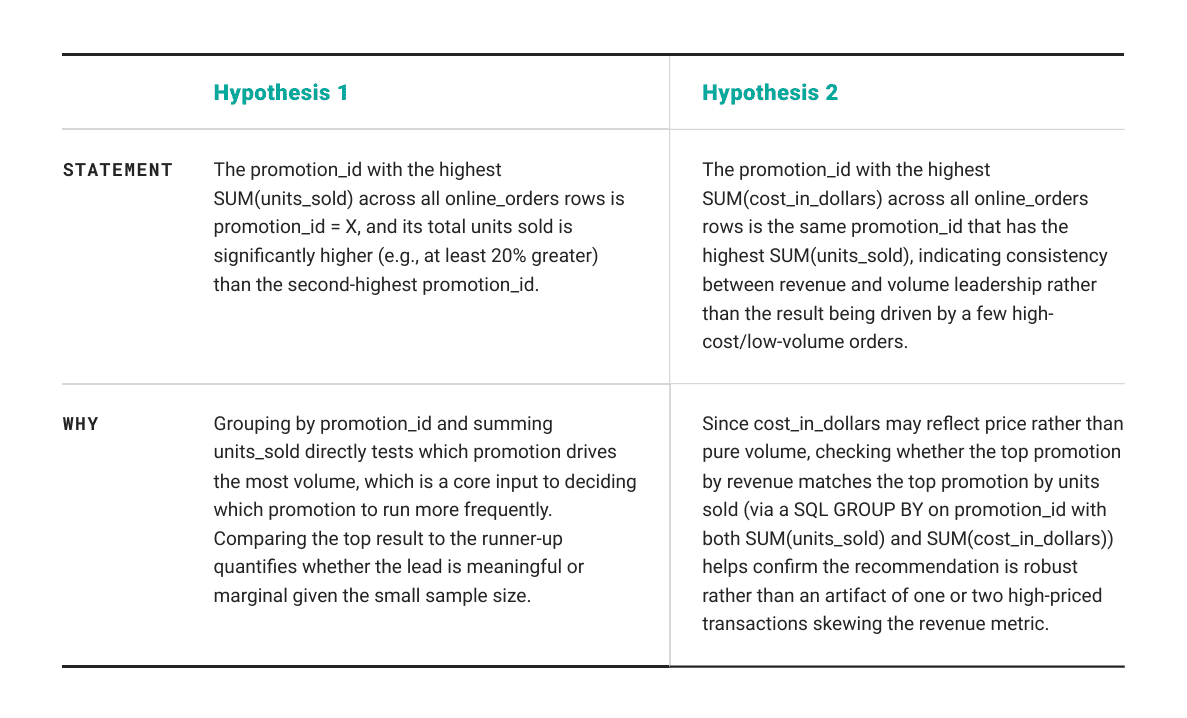
The pipeline tests the first hypothesis. Notice it is not a raw average: it asks whether the volume leader beats the runner-up by a real margin, which already reads differently from the “highest average” query above that put a 1-order promotion on top.
Stage 3: SQL Planning
The third stage turns the top hypothesis into an actual query. We ask for a row count alongside any grouped metric, since a group’s size is what the validation stage checks next.
def plan_sql(self, hypothesis):
    columns = list(self.schema["column_name"])
    prompt = f"""Table: {self.table_name}
Columns: {columns}
Hypothesis to test: {hypothesis['hypothesis']}
Write one DuckDB SQL query that tests this hypothesis.
Use only the available columns, do not invent columns, and if the query
groups rows, include a COUNT(*) column named n_orders so the result can
be checked for sample size before anyone trusts it.
Return JSON only: {{"sql": "...", "purpose": "..."}}"""
    plan = parse_json(self.llm.complete(prompt))
    return plan
Output
Generated SQL:
    WITH promo_sums AS (
        SELECT promotion_id, SUM(units_sold) AS total_units, COUNT(*) AS n_orders
        FROM online_orders
        GROUP BY promotion_id
    ),
    ranked AS (
        SELECT promotion_id, total_units, n_orders,
               RANK() OVER (ORDER BY total_units DESC) AS rnk
        FROM promo_sums
    )
    SELECT
        r1.promotion_id AS top_promotion_id,
        r1.total_units AS top_total_units,
        r1.n_orders AS top_n_orders,
        r2.promotion_id AS second_promotion_id,
        r2.total_units AS second_total_units,
        r2.n_orders AS second_n_orders,
        (r1.total_units - r2.total_units) * 1.0 / r2.total_units AS pct_difference
    FROM ranked r1
    JOIN ranked r2 ON r2.rnk = 2
    WHERE r1.rnk = 1

   'purpose': 'Identify the promotion_id with the highest total units
     sold and compare it to the second-highest to test whether it exceeds
     it by at least 20%, including order counts to assess statistical
     support.'
Rather than a simple groupby, the model reached for a common table expression (CTE) with a window function, ranking promotions by total units and pulling the top two into the same row for comparison.
Stage 4: Validation
The fourth stage runs the query and checks n_orders against a minimum support threshold. This is the one stage that is plain code, not a model call, because the check has to be enforced, not suggested.
def validate(self, sql_plan):
    result = self.con.execute(sql_plan["sql"]).df()
    if "n_orders" in result.columns:
        result["low_confidence"] = result["n_orders"] < self.MIN_SUPPORT
    else:
        result["low_confidence"] = False
    return result
Output
| top_promotion_id | top_total_units | top_n_orders | second_promotion_id | second_total_units | second_n_orders | pct_difference | low_confidence |
|---|---|---|---|---|---|---|---|
| 1 | 77.0 | 12 | 2 | 55.0 | 10 | 0.4 | False |
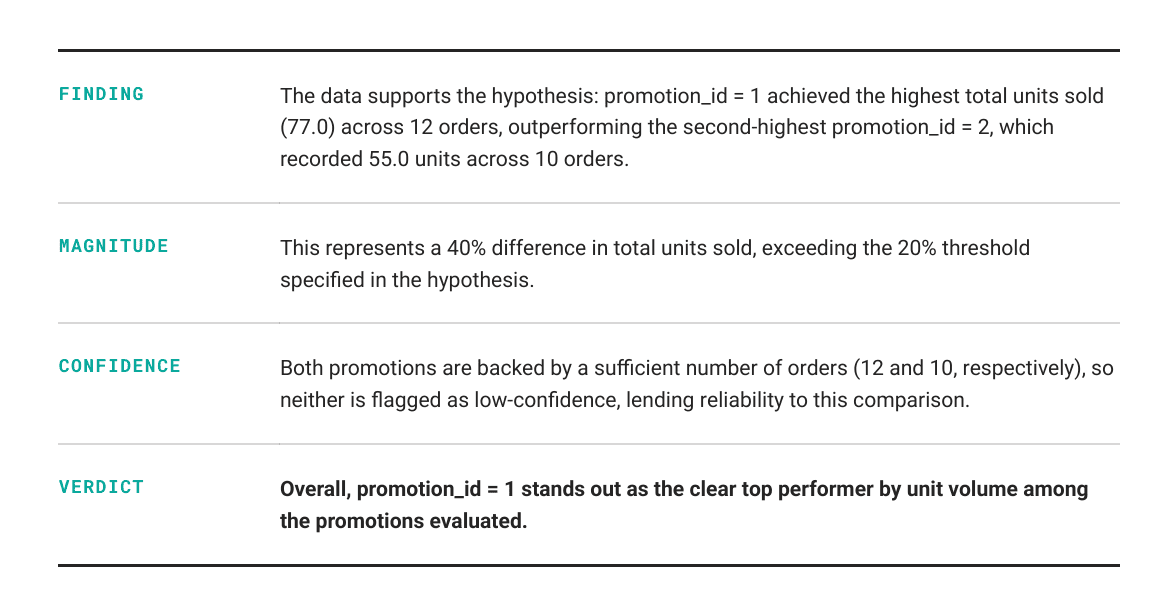
This query only produces one row, and it is not flagged. Promotion 1 leads on total units with 12 orders behind it, promotion 2 is the runner-up with 10, and both clear the minimum of 3 we set. The check still ran here — it just had nothing to catch, because this hypothesis compares two well-supported groups instead of resting on promotion 4’s single order.
Stage 5: Executive Summary
The fifth stage writes the summary, and it is told explicitly to leave any flagged row out of the headline claim.
    def summarize(self, hypothesis, validated_result):
        flagged = validated_result[validated_result["low_confidence"]]
        prompt = f"""Hypothesis: {hypothesis['hypothesis']}
    Query result:
    {validated_result.to_string(index=False)}
    Rows marked low_confidence have fewer than {self.MIN_SUPPORT} orders
    behind them and should not anchor a conclusion.
    Low-confidence rows: {flagged.to_dict('records')}
    Write a concise 3 to 4 sentence executive summary of what this result
    supports. Base the conclusion only on the data shown, explicitly avoid
    using low-confidence rows as the headline, and do not invent
    explanations that are not supported by the data."""
        return self.llm.complete(prompt)
Output
Stage 6: Recommendations
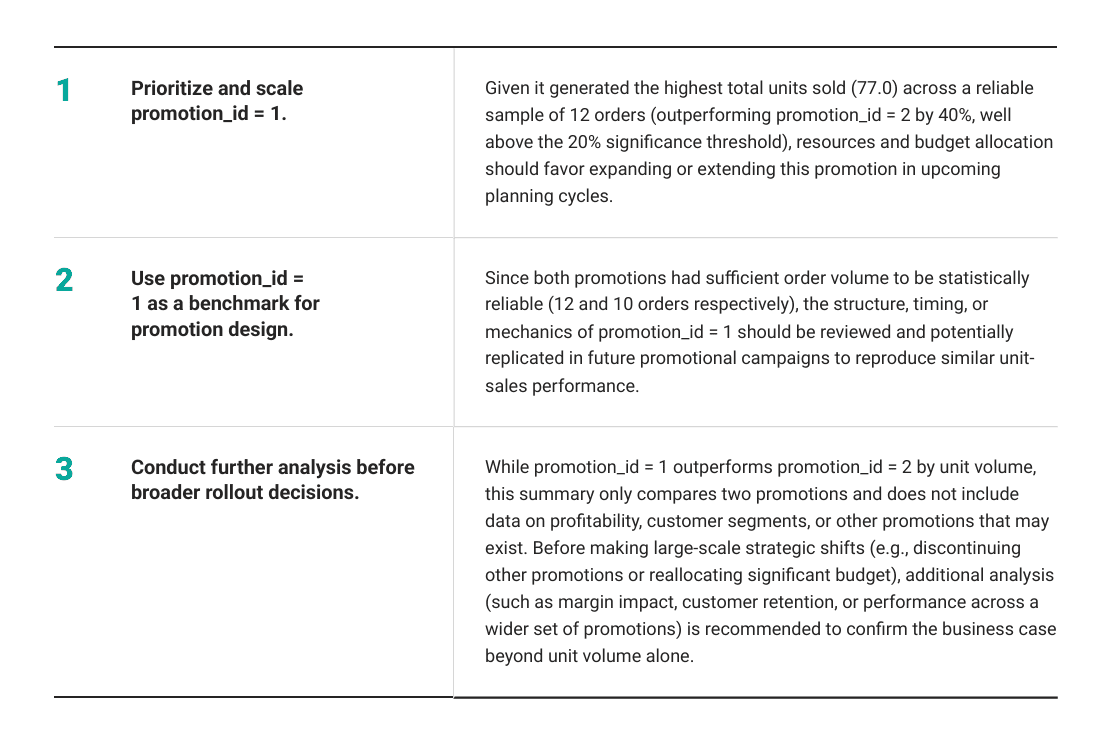
The sixth stage proposes actions, and it is told the same rule applies: no recommendation may rest on low-confidence data or facts the summary did not support.
    def recommend(self, summary):
        prompt = f"""Executive summary: {summary}
    Propose 2 to 3 specific business recommendations based only on what the
    summary supports. Recommendations must follow from the evidence, must
    not rest on low-confidence data or invented facts, and if the evidence
    is weak, should recommend further analysis instead of pretending the
    answer is certain."""
        return self.llm.complete(prompt)
Output
Putting It Together
A run method chains the six stages. One call takes a question in and returns every intermediate result: the context, the hypotheses, the SQL plan, the validated table, the summary, and the recommendation.
    def run(self, question):
        context = self.understand_business_context(question)
        hypotheses = self.generate_hypotheses()
        top_hypothesis = hypotheses[0]
        plan = self.plan_sql(top_hypothesis)
        validated = self.validate(plan)
        summary = self.summarize(top_hypothesis, validated)
        recommendation = self.recommend(summary)
        return {
            "context": context,
            "hypotheses": hypotheses,
            "sql_plan": plan,
            "validated_result": validated,
            "summary": summary,
            "recommendation": recommendation,
        }
Calling It
Calling it looks the same regardless of which provider you bring. The provider is set explicitly rather than guessed from the client object, and the pipeline refuses to run if you forget to paste in a real key.
    PROVIDER = "anthropic"
    API_KEY = "YOUR_API_KEY_HERE"
    ANTHROPIC_MODEL = "claude-sonnet-5"
    OPENAI_MODEL = "gpt-4o"
    if API_KEY == "YOUR_API_KEY_HERE":
        raise ValueError(
            "Paste your real API key into API_KEY before running the LLM section."
        )
    if PROVIDER.lower() == "anthropic":
        from anthropic import Anthropic
        client = Anthropic(api_key=API_KEY)
        llm = LLMClient(client=client, model=ANTHROPIC_MODEL, provider="anthropic")
    elif PROVIDER.lower() == "openai":
        from openai import OpenAI
        client = OpenAI(api_key=API_KEY)
        llm = LLMClient(client=client, model=OPENAI_MODEL, provider="openai")
    else:
        raise ValueError("PROVIDER must be either 'openai' or 'anthropic'.")
    analyst = SeniorAnalyst(llm, "online_orders", orders)
    result = analyst.run("Which promotion should we run more of?")
    print(result["summary"])
    print(result["recommendation"])
Set PROVIDER to openai instead, drop in an OpenAI key, and the same six stages run against gpt-4o unchanged. LLMClient is the only piece that knows which API it is talking to.
Conclusion
None of the six stages here is complicated on its own. Restating a question, writing SQL, and summarizing a table are things a single prompt already does reasonably well. The value comes from the validation stage between the query and the summary — checking n_orders before anything gets called an answer.
On this dataset, that check already caught something before the LLM was even called: the plain SQL groupby above ranked promotion 4 first by average units per order, resting on exactly 1 order. The hypothesis the model chose to test this run compared two well-supported groups instead — 12 orders against 10 — so validate() had nothing to flag. The pipeline runs the same n_orders check regardless of which comparison the model hands it, so a future table, or a future run that tests an average instead of a total, gets caught by the same line of code.
This pipeline has 6 methods on one class, and the same 6 run again on the next table you point it at.
Nate Rosidi is a data scientist and in product strategy. He’s also an adjunct professor teaching analytics, and is the founder of StrataScratch, a platform helping data scientists prepare for their interviews with real interview questions from top companies. Nate writes on the latest trends in the career market, gives interview advice, shares data science projects, and covers everything SQL.