
In their paper FrugalGPT: How to Use Large Language Models While Reducing Cost and Improving Performance, Lingjiao Chen, Matei Zaharia, and James Zou describe three ways to cut the cost of calling a large language model (LLM). They call these prompt adaptation, LLM approximation, and LLM cascade. The authors report that their cascade tries cheaper models first. On the tasks they tested, it can match the performance of the best individual model with up to 98 percent cost reduction. That number belongs to their tasks, so an agent that reads rental listings needs its own measurement.
I built a small agent I could inspect call by call. It checks apartment listings against a renter’s requirements, such as a two bedroom in Austin under $1,500 that allows dogs. My first version sent every listing to a strong model, even when a city name or a rent figure already ruled the listing out. When I opened the trace, that meant 2,500 model calls to find 101 real matches.
That first version is a straw man, so this article measures three starting points instead of one. The first sends every pair to the model. The second is an agent that already searches by city. The third runs a database query on city, bedrooms, and rent before any model sees a listing, which is what a careful engineer would build first.
This article shows what I ran. I took a fixed sample of 500 listings from a public dataset of 2019 United States rental ads. I wrote five renter requirements and scored every version of the agent against the same answers. The strong model was OpenAI’s gpt-6-sol, which I call Sol, and the cheaper model was gpt-6-luna, which I call Luna.
I traced every call with Weights & Biases (W&B) Weave, the W&B tool that records each step of an application. The complete script is in the article, and the logged tables are in a W&B Report.
Against the database query starting point, the final version cost about 25 times less. The estimated cost was $0.008 against $0.20 for the same 2,500 checks, and the final version returned all 101 matches with no wrong ones. Letting code settle the pets field made up about 44 percent of that drop, and using the cheaper model with a strong backup made up about 39 percent. A shorter prompt and reused answers made up the rest.
The totals were not the most useful part of the test. Three findings surprised me, and I kept all of them.
-
Weave’s cost column showed $0.0000 for every call. The real token counts were stored in the raw record, but the usage table displayed zero.
-
Sol missed a match 10 times out of 10 with the full listing, and found it 10 times out of 10 with only the title and body. Sending less text gave a better answer.
-
Both models reported a confidence of 5 on almost every answer. A rule that escalates below 5 almost never fires, so it cannot do much work.
The article also says where the test is weak. Only one of the 101 matches depends on reading text, so the test measures cost far better than it measures understanding.
Contents
- What does the agent read, and how did I build the test?
- How do I know a match is correct, and what counts as cost?
- How do I run the experiment?
- What does the baseline trace show?
- Is sending every listing to a model a fair starting point?
- Which model calls can the pets field settle without a model?
- Does sending less text change the answer?
- Can the agent reuse an answer safely?
- Is the cheaper model safe to use?
- What did the combined version cost, and what does the evidence support?
- What should keep running after launch?
- Optimize for useful matches, not the smallest bill
- Selected Sources
What does the agent read, and how did I build the test?
The agent answers one yes or no question for each listing and each renter requirement. I call one listing checked against one requirement a pair, so 500 listings and 5 requirements make 2,500 pairs.
The listings come from the Apartment for Rent Classified dataset in the University of California, Irvine (UCI) Machine Learning Repository. It holds 10,000 United States rental ads with 22 fields, including the title, the body text, amenities, bedrooms, bathrooms, rent, square feet, city, state, and pets allowed. The dataset is licensed under Creative Commons Attribution 4.0, and its listing timestamps run from September to December 2019. These are historical ads, so nothing here describes today’s rents.
The sample has 500 listings chosen with a fixed random seed of 42. It holds 200 from Austin, 100 from Dallas, 100 from Houston, and 100 from other cities. Five renter requirements run against it, and every requirement also asks for a place that allows dogs.
-
Austin, 1 bedroom, rent up to $1,300.
-
Austin, 2 bedrooms, rent up to $1,800.
-
Austin, 2 bedrooms, rent up to $1,500.
-
Dallas, 2 bedrooms, rent up to $1,600.
-
Houston, 1 bedroom, rent up to $1,200.
The mix of cities is deliberate, because a feed that covers several cities gives a filter something to reject. It also flatters the filter, and I return to that limit in the results. The prompts and the traces leave out the street address, the coordinates, and the source listing ID. Only a row number such as row_3445 identifies a listing.
How do I know a match is correct, and what counts as cost?
A pair is a true match when the listing is in the right city, has the right number of bedrooms, costs no more than the rent limit, and allows dogs. The first three checks use fields with explicit values. The pets field says things like “Cats,Dogs” or “Cats”, and that decides the fourth check whenever the field is filled in.
The pets field is blank on 4,163 of the 10,000 listings, so the text has to decide those. There are 128 sampled listings that pass the city, bedroom, and rent checks with a blank pets field. An AI assistant (Claude) read every title and body of those listings against one written rule. The rule says dogs are allowed only when the text says dogs or pets are allowed. Silence, or a hint that does not say so directly, counts as not confirmed.
The result was lopsided. One listing, row_3445, calls itself “a pet friendly community” and adds a 25 pound weight limit, so I count it as a match. Two listings hint at pets without saying so. row_1808 lists a “Pet park” and row_8465 mentions “a pet bar for your favorite 4 legged friends”, so both count as not confirmed. The other 125 listings say nothing about pets.
Before this reading, I had written a keyword search for phrases such as “pet friendly” and “no pets”. It agreed with the reading on all 128 listings.
Two limits follow from this. The labels are one reader’s judgment, and the two hint listings are arguable. Also, only 1 of the 101 true matches depends on reading text, because the other 100 come from the pets field. The test therefore says much more about cost than about how well a model understands rental ads.
Precision and recall score the result. Precision is the share of returned matches that are correct, and higher is better. Recall is the share of true matches that were returned, and higher is better. With 101 true matches, one miss moves recall by about one percentage point.
Cost here means API inference cost, which is what the provider charges for tokens. A token is a small chunk of text, roughly a short word, and providers bill input tokens and output tokens at different rates. Output tokens include the hidden reasoning tokens a model spends thinking before it answers. The OpenAI pricing page listed these standard rates on September 27, 2026. Sol cost $2.00 per million input tokens and $10.00 per million output tokens, and Luna cost $0.10 and $0.50.
Every dollar figure below is an estimate from those rates and the token counts each response reported. It is not an invoice, and it leaves out infrastructure and labor. I also report model time, which is the sum of the time every call took.
How do I run the experiment?
The steps below work on macOS and Linux. On Windows, activate the environment with .venvScriptsactivate. I ran everything with Python 3.9.6 and these package versions, weave 0.52.17, openai 2.48.0, pandas 2.3.3, and py7zr 1.0.0. The script needs an OpenAI API key with billing enabled and a free W&B account with its API key. Without the W&B key, the script stops when it calls weave.init, so the traces and the report are unavailable.
Create the working folder, install the packages, and set both keys in the terminal you will use for every command in this article.
The dataset downloads as a zip file that holds a compressed 7z file. These commands fetch and unpack it into a data folder, which leaves data/apartments_for_rent_classified_10K.csv in place.
Save the following script as apartment_agent.py in the apartment-agent-cost folder. It holds everything the experiment needs, including the requirements, the field rules, the ground truth labels, the prompts, the cache, and the six configurations. Comments in the code mark the parts the later sections explain.
Run the configurations from the apartment-agent-cost folder, one command each. The baseline run makes 2,500 Sol calls and takes several minutes, and the others are quicker.
Each command saves its full results to an outputs folder and prints a summary. The block below is captured output from a rerun of the luna configuration in a fresh folder with the exact script above.
The models do not accept a temperature setting, so every run uses the default and answers can differ from run to run. Your numbers will be close to the ones in this article and will not match digit for digit. The rerun above already shows a difference, because it made no wrong match, and the run I captured for the comparison made one. The section on the cheaper model explains why.
What does the baseline trace show?
The trace of the send every pair baseline shows one model call per pair and no sign of which calls were needed. Weave records this by wrapping a function with @weave.op, and the OpenAI integration adds a child call for every request to the model. Each trace is a tree of calls with inputs, outputs, timing, and token counts, and it works like a receipt that lists every step the agent took.
gpt-6-luna call whose Usage table reads 0 tokens and $0.0000, even though the stored record holds 141 input and 63 output tokens. The right view shows the prompt replaced by a redaction note, so cost figures in this article come from stored token counts and the rate card.The left view of the screenshot contains the most surprising result of the setup. Weave counted the request correctly, yet its Usage table showed zero tokens and a total cost of $0.0000 for both models. The Weave cost documentation says Weave applies built in pricing for supported integrations. It also describes an add_cost() method for models without a price, and these runs did not use it.
A zero is not a price, so I calculated cost from the token counts stored in each call record. The one call in the screenshot used 141 input and 63 output tokens.
The right view shows the redaction. The script passes a global_postprocess_inputs function to weave.init, and that function replaces every prompt with a note such as [redacted 245 chars] before the trace uploads. I then searched every stored call in the project for distinctive listing phrases and for 400 street addresses from the sample, and found none.
That first baseline is easy to summarize. Sol made 2,500 calls, one per pair, using 618,635 input tokens and 63,782 output tokens, of which 18,424 were reasoning tokens. The estimated cost was $1.88, and the calls added up to 2,991 seconds of model time. The baseline ran eight calls at once, so its wall clock time was 376 seconds.
Is sending every listing to a model a fair starting point?
No, and a fairer comparison shrinks the savings. Sending every pair to Sol is the version I built first, and few real agents do it. Most narrow the feed before a model sees anything, so I measured two more starting points on the same 2,500 pairs with the same full listing prompt.
The second starting point sends only pairs whose city matches. It made 796 Sol calls and cost an estimated $0.61, so it is about 3 times cheaper than sending everything. The third runs a database query on city, bedrooms, and rent, then sends each surviving pair to Sol. It made 264 calls and cost an estimated $0.20, about 9 times cheaper than sending everything. That query is ordinary database work and has no model cost.
All three runs missed the same match, row_3445, which the next sections explain. I measure every later saving against the $0.20 query starting point, because a careful engineer would build it first. It still spends model calls on 264 pairs, and those pairs are where the rest of the article starts.
Which model calls can the pets field settle without a model?
Another 107 of those 264. A mail room clerk sorts envelopes by postal code, and the same clerk can also see that some envelopes already carry an approval stamp. The pets field works like that stamp. When it is filled in, it says dogs are allowed or it says they are not, and no model needs to read the listing.
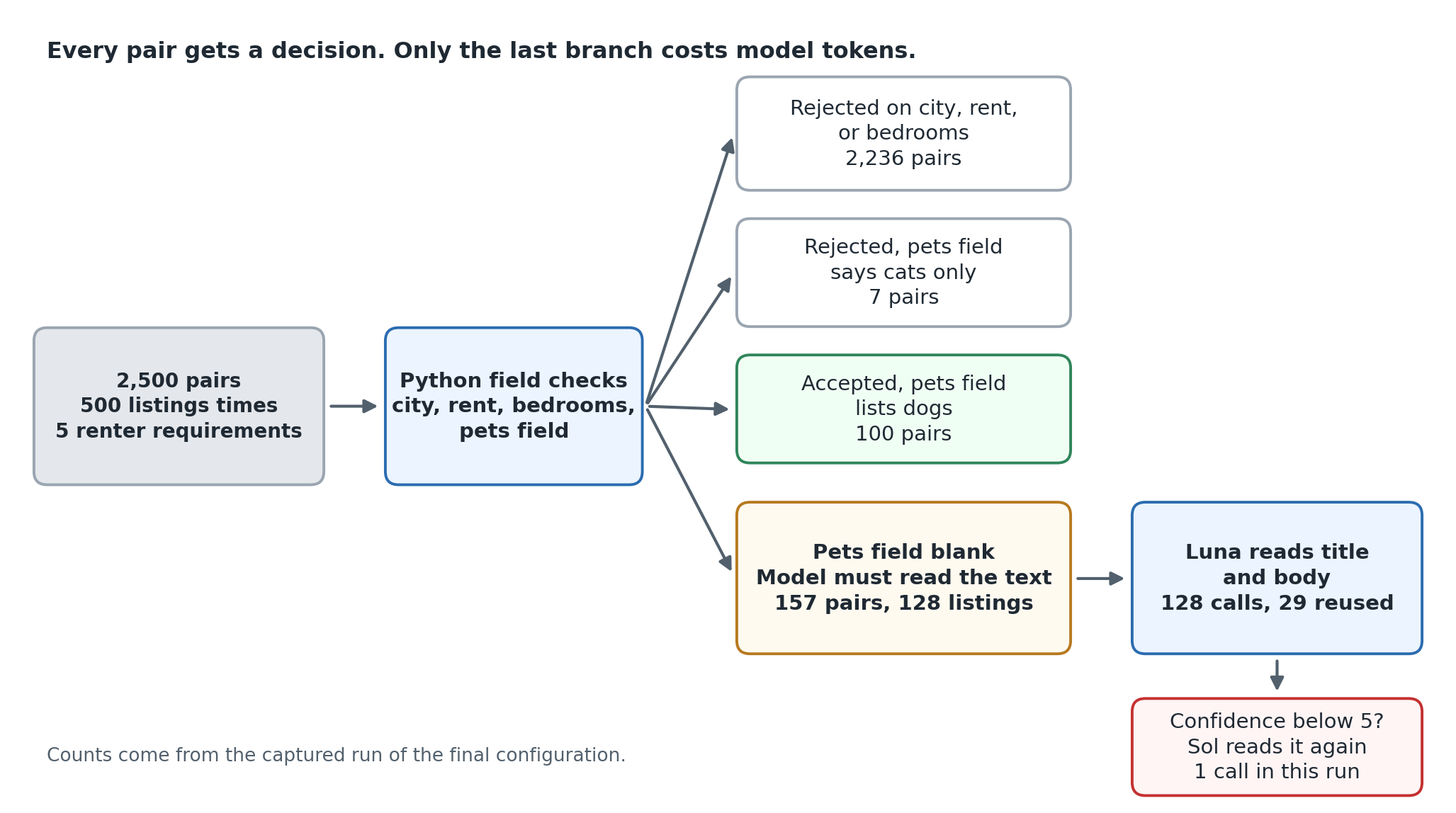
The diagram shows where the pairs went. Field checks rejected 2,236 pairs, and 1,704 of those had the wrong city. That first branch is the same work the database query does, and it covers 89 percent of all pairs in my mixed city sample.
The pets field settled the next 107 pairs. Seven were rejected because the field said cats only, and 100 were accepted because it listed dogs. That left 157 pairs, which cover 128 different listings, for a model to read.
The filter configuration sends only those 157 pairs to Sol with the same full prompt. Its estimated cost fell from $0.20 for the query starting point to $0.11, about 43 percent lower, and its model time fell from 352 to 203 seconds. Precision stayed at 1.0 and recall stayed at 0.990, since it missed the same match as the starting points. That is what a correct rule should do, because it changes which pairs reach the model and leaves the answer for the remaining pairs alone.
Does sending less text change the answer?
It changed the answer in this test. The reduced configuration asks Sol one question, whether the title and body say dogs are allowed. It drops the amenities, rent, city, and other fields, because the field checks already handled them.
Input tokens fell from 34,194 to 23,624, about 31 percent lower, and the estimated cost fell from $0.114 to $0.098. The saving is smaller than the token drop suggests. Output tokens rose from 4,589 to 5,039, and each output token costs five times as much as an input token.
The reduced run also found the match that all three starting points missed. With the full listing, Sol answered no for row_3445, the pet friendly community, with the highest confidence. To check that this was not luck, I asked each version of the question 10 times. The full listing prompt gave 0 correct answers out of 10, and the title and body prompt gave 10 out of 10.
I do not know why. One possible reason is that the full prompt shows a line saying the pets field is not listed, right next to the instruction that unstated dogs count as not confirmed. I did not test that idea.
The repeat check also covered the second hard listing, row_8465, the one with the “pet bar”. The table below shows how many of the 10 answers were correct for each model and prompt. For row_8465, a correct answer is not confirmed, following my label.
|
Model |
Prompt |
|
|
|---|---|---|---|
|
Sol |
Full listing |
0 |
10 |
|
Sol |
Title and body only |
10 |
7 |
|
Luna |
Title and body only |
10 |
8 |
Both models split on row_8465, answering yes two or three times in ten. That listing is a coin flip, and the table shows how much a single run can depend on one such listing.
Can the agent reuse an answer safely?
Yes, if each stored answer remembers what produced it. A cache is a notebook of past answers, and its risk is reading an old answer for a question that has changed. The script keys each answer by the model, the listing’s title, body, and pets field, and a prompt version string. Editing a listing, changing the prompt version, or switching models therefore changes the key, and the old answer is never found.
The renter’s requirement is not part of the key, because the pet question does not depend on the requirement. The question is the same when two renters both want a dog friendly place in Austin. That is why the cache helped, since the same listing shows up under more than one requirement. It answered 29 of the 157 pairs from memory, so model calls fell from 157 to 128 and the estimated cost fell from $0.098 to $0.082.
The cache in the script lives in memory for one run. A production cache needs an expiry time and a way to drop entries when a listing is removed or edited. Those parts were outside this test.
Is the cheaper model safe to use?
For this workload, almost. Luna reads the same 128 listings with the same title and body prompt, and the estimated cost fell from $0.082 to $0.005, about 16 times lower again. In the captured run Luna made one wrong match, and in a rerun it made none. It said yes to the “pet bar” listing with a confidence of 4 on a scale from 1 to 5, so precision was 0.990 and recall was 1.0.
Escalation gives the agent a second opinion. Like a junior clerk who passes uncertain cases to a senior one, Luna answers first and Sol reads again only when Luna’s confidence falls below a threshold. Luna answered 5 for 127 of its 128 questions, and Sol answered 5 for all 157 of its questions. The confidence scores barely vary, so a threshold has little to work with.
I have to be honest about the threshold. I split the listings into a development half and a test half, so I could tune the threshold on one half and report on the other. The development half had no errors from any configuration, and both hard listings fell in the test half. That left nothing to tune on, and I chose a threshold of 5 after seeing which answer had a confidence of 4. The final result is therefore an illustration and not a validated setting.
With that caveat, the final configuration escalated one answer. Sol read the “pet bar” listing again, said no with a confidence of 4, and the run had no wrong matches. It made 129 calls, 128 to Luna and 1 to Sol, and the estimated cost was $0.0079.
The rerun in the setup section adds a warning. Luna alone made no wrong match there, and it answered the same listing correctly with a confidence of 5. So one wrong match against none is noise on a coin flip listing, and my run cannot show that escalation fixed anything.
One more cost detail matters. Luna’s 128 calls used 6,105 output tokens, more than Sol’s 4,319 for the same questions, because Luna spent more tokens on reasoning. About 61 percent of Luna’s estimated cost was output tokens, so limiting reasoning effort is a lever I did not test.
A keyword search would have matched my labels on all 128 blank listings, so is a model worth keeping in this loop at all? The repeat check above shows where the two would differ, and the last section says what I would monitor to decide.
What did the combined version cost, and what does the evidence support?
The lowest cost version that made no errors in the captured runs was Luna with a Sol backup, at an estimated $0.0079 for 2,500 pairs. The query starting point cost $0.20 for the same pairs, about 25 times more, and the table lists every configuration.
|
Configuration |
Model calls |
Estimated cost |
Model time |
Result |
|---|---|---|---|---|
|
Send every pair to Sol |
2,500 |
$1.875 |
2,991 s |
1 match missed |
|
Same city pairs only |
796 |
$0.613 |
1,072 s |
1 match missed |
|
City, bedrooms, and rent query |
264 |
$0.199 |
352 s |
1 match missed |
|
Plus pets field check |
157 |
$0.114 |
203 s |
1 match missed |
|
Title and body only |
157 |
$0.098 |
199 s |
No errors |
|
Reuse answers |
128 |
$0.082 |
168 s |
No errors |
|
Luna only |
128 |
$0.005 |
131 s |
1 wrong match |
|
Luna with Sol backup |
129 |
$0.008 |
139 s |
No errors |
The interactive version of this table, the cost chart, and every model call are in the W&B Report.
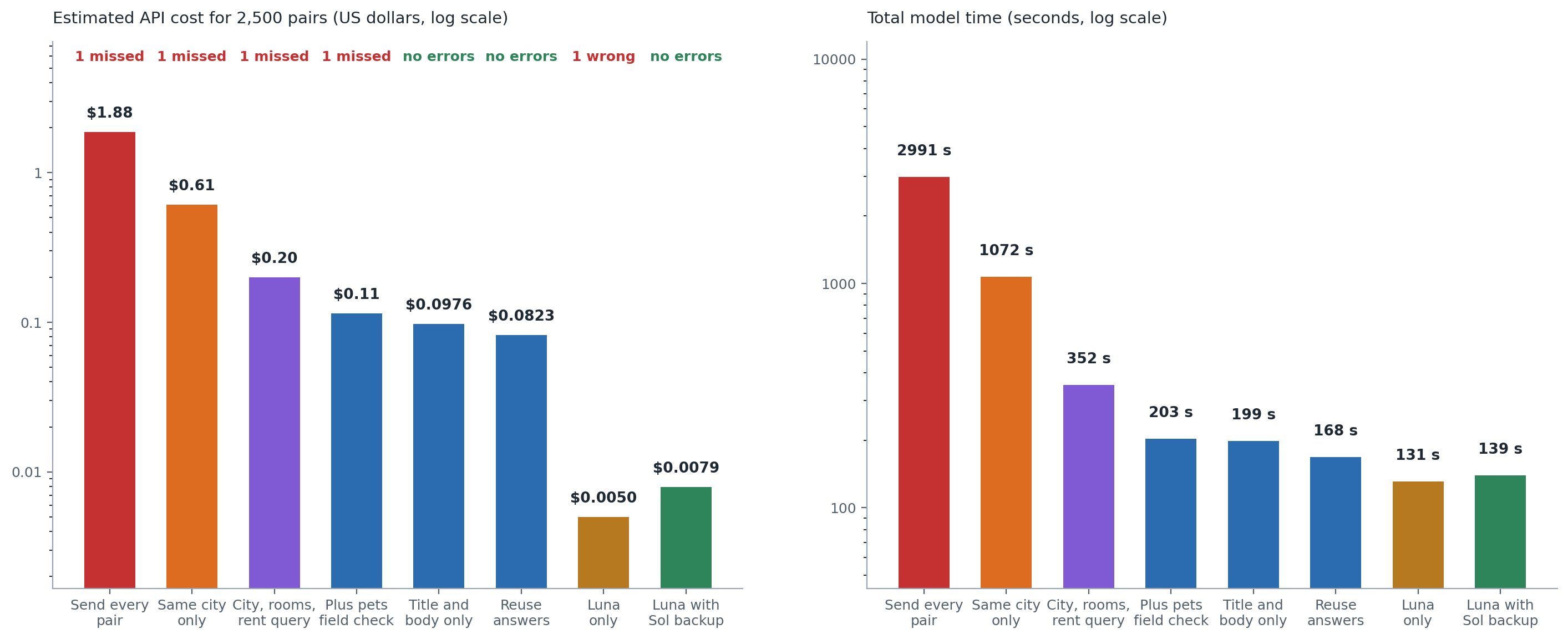
The chart shows where the money went. Starting from the $0.20 query starting point, the total drop was about $0.19. The pets field check accounts for 44 percent of it and the cheaper model with a backup for 39 percent. The shorter prompt accounts for 9 percent, and reused answers for 8 percent. Model time fell from 352 to 139 seconds.
Per 1,000 pairs, the estimated cost went from $0.080 to $0.0032. That is arithmetic on the rate card, and it does not forecast a bill for any other feed.
The first two steps down the chart, from sending everything to a city search and then to a full query, are ordinary query work. They account for most of the distance between $1.88 and $0.008, and they need no model at all.
What this test supports is narrow. It ranks the cost drivers for one agent on one sample of 2,500 pairs with 101 true matches and one run per configuration. It cannot say how the agent behaves for real renters, in other cities, on ads from another year, or on listings with longer text. It also cannot pick a universal best setting.
It supports one conclusion. In this agent most model calls were avoidable, and code could settle most of them. The cheaper model handled the rest at about 4 percent of the query starting point’s cost.
What should keep running after launch?
A recurring check should watch the same numbers I used here. Traffic, prompts, models, and retries all move cost after launch, and a trace makes each of them visible. Four numbers from this example are enough to start.
-
Model calls per pair. Sending every pair makes 1.0, the query starting point makes 0.106, and the final configuration makes 0.052. A jump means more pairs are reaching the model.
-
The share of pairs the field checks settle. It was 93.7 percent here, and a drop means the feed or the requirements changed.
-
Tokens per call, including reasoning tokens. A prompt change or a model change shows up here first.
-
Precision and recall on a fixed set of pairs with known answers. Rerunning these 2,500 pairs with the final configuration costs less than a cent at the rates above.
Two setup details will help. Register the rates with add_cost() so that Weave shows real numbers in its Usage table instead of zero. Keep the prompt version string in the cache key, so a prompt edit cannot reuse an old answer.
The confidence scores deserve a watch too. If almost every answer scores 5, an escalation rule that fires below 5 will rarely fire, and the backup model will sit idle while the cheaper model carries every decision.
Optimize for useful matches, not the smallest bill
The method in this article has four steps. Trace the run, find the model calls that code could settle, change one thing, and score the same pairs again. In this agent that sequence cut the estimated cost about 25 times against a database query starting point and left the answers intact. Against sending every pair, the cut was about 237 times, but few real agents start there. The same steps could have exposed a quality loss, and the runs were built to show one if it appeared.
Open one real trace from your own agent and count the calls that a field check or a lookup could have answered. Then test the largest cost driver first, on a fixed set of examples with answers you trust. The next technical question I would ask is whether a lower reasoning effort keeps the same answers at a lower price, since output tokens drove most of Luna’s bill.
Selected Sources
-
FrugalGPT: How to Use Large Language Models While Reducing Cost and Improving Performance, Lingjiao Chen, Matei Zaharia, and James Zou, 2023. This paper names the three cost reduction strategies and reports the cascade result quoted in the opening. Its findings belong to the tasks the authors tested.
-
Apartment for Rent Classified, UCI Machine Learning Repository, 2019, DOI 10.24432/C5X623, licensed under Creative Commons Attribution 4.0. This is the source of all 10,000 listings and the field descriptions.
-
W&B Weave cost tracking documentation. It describes how Weave reads token usage, applies built in prices for supported integrations, and adds custom costs with
add_cost(). -
OpenAI API pricing, checked on September 27, 2026, for the Sol and Luna standard rates used in every cost estimate.
-
OpenAI’s model pages for Sol and Luna, checked on September 27, 2026. Sol is described as built for complex coding and agentic workflows, and Luna as the most efficient model for focused, high volume tasks. The pages list
gpt-6-solas the default snapshot andgpt-6-lunaas the single snapshot.