
In this article, I’ll cover one of the main new techniques that I started using in the last few months to make my coding more effective, which is to interact with all my coding agents and sessions through one centralized herder agent.
This is a setup where, instead of having to manually swap between the different coding agents that are working and see if there’s anything I need to answer or do, I interact with all of them through a centralized coding agent (called the “herder,” from herding sheep). So I spend less time looking for work to do and more time just completing the work I have to do, answering the queries my coding agents have for me, freeing up more time to spend on other things such as spinning up new coding agents or human testing.
As I’ve applied these techniques in the last two months, I’ve seen efficiency gains of upwards of 30% based on a comparison of the work I was able to achieve before an after I started doing this.
This infographic highlights the main contents of this article. I’ll discuss how to more efficiently interact with all your coding agents by having a centralized orchestrator agent called a herder, imaged by ChatGPT.
Why interact through a centralized herder?
The main reason you want to interact through a centralized herder is that a lot of people spend a lot of time looking through the different coding agent sessions that they have running, seeing if there’s anything they need to reply to.
And yes, new IDEs such as Paradev, which I’m using now, do offer a kind of visual indicator on whether a coding agent is waiting on you or if it’s busy and working. However, in my experience, these indicators are wrong at least a third of the time, which makes having a herder more efficient. An example of the visual indicator is shown in the image you see below.
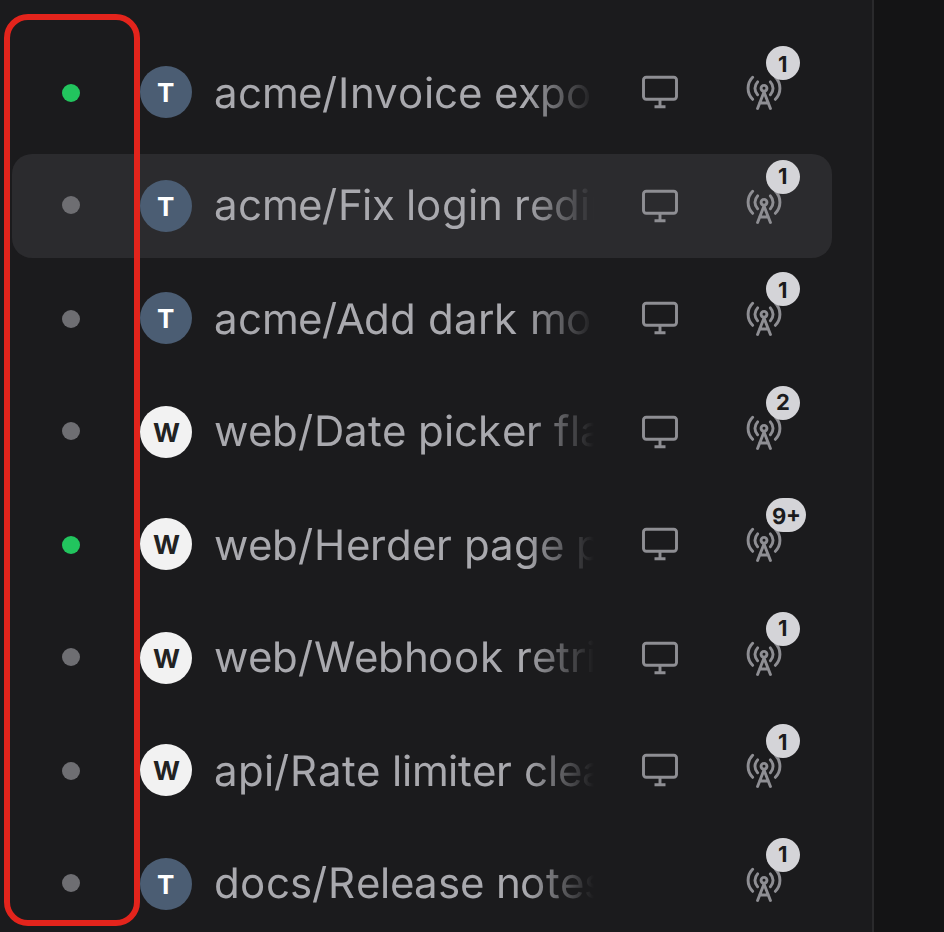
This image shows how Paradell shows if sessions need user input. If the session has a green icon beside it, it typically means that the coding agents are waiting on the user. However, in my experience, this often shows the wrong thing, either being green when it’s not actually ready for the user or not being green when it is waiting on the user. Image by the author.
So, similar to most techniques that I cover for being a more efficient programmer, there are two main reasons you should interact through a centralized herder:
-
You save time because you don’t have to look through all sessions to figure out where a coding agent is waiting on your reply.
-
You lower the mental strain because you don’t have to spend any mental capacity thinking about what to do next. The herder prioritizes for you, and you simply answer the queries the coding agents have for you.
Also, interacting through a centralized herder allows you to customize the design of how you interact with your coding agents. What I did was that my initial herder, when I set it up, was just a new Paradev Session. However, I’ve quickly learned that I could just create my own HTML page, which is designed exactly how I prefer to get the information on each session, helping me be as efficient as possible. I’ll show exactly what the setup looks like later in this article.
How to set up a herder agent
Let’s discuss how to set up a herder agent. There are two main techniques that you can use to do this. You can either set up polling sessions using cheap models, such as Haiku 5.5 from Anthropic, polling all other coding sessions you have running, and telling those cheap agents to inform the herder agent if any updates are made, and specifically if any queries are made to the user from the coding agents.
This setup works; it’s simple, it’s very easy to understand, and it’s very consistent. You can, for example, set up the polling to happen every minute with a cheap agent. This is sustainable because those agents are so cheap to run, and they only need to react or run again if there have been changes to the output of a specific coding session. And yes, it’s a simple setup.
The second way is to set up a type of webhook, which is a more efficient implementation. In this implementation, you basically tell all the coding agents that you have running that, whenever they are done or whenever they need input from the user, they should call a specific function. And this function informs the herder that an update has been made to the calling session and it needs user input. The herder can then immediately know when it has to ask the user a query and what to ask the user. This requires a bit more setup, but it is a more efficient setup, and it is the setup I chose to use.
This is the HTML implementation, with a representation below showing how I set it up.
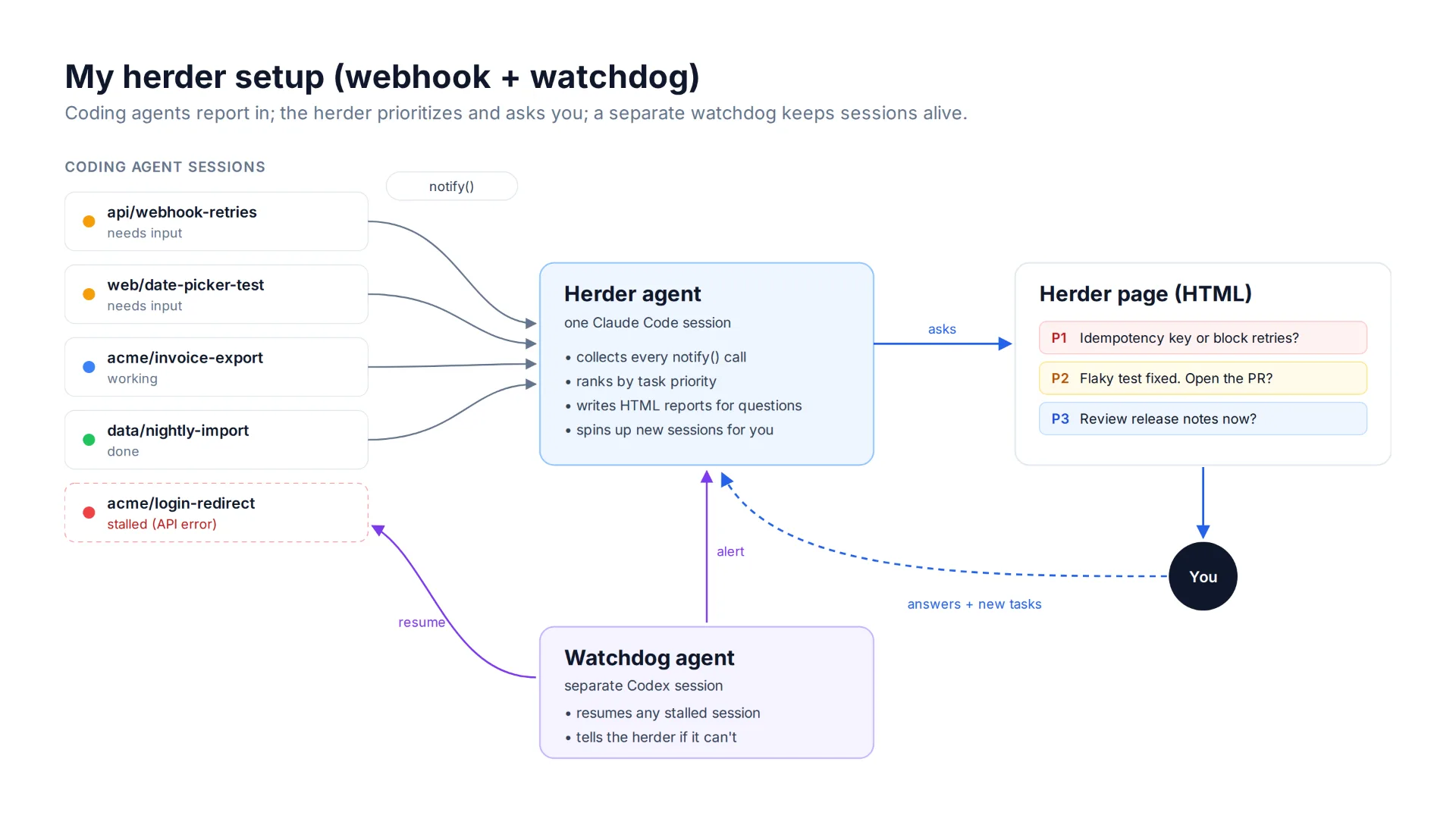
This image highlights my herder setup through a webhook plus watchdog setup. Image by the author.
Whenever I want to write, edit, or understand code, I typically run my sessions through the herder. This is how it works: the herder informs me immediately whenever a task requires my attention, and it prioritizes based on the task. So the highest-priority tasks come to me first. I then go look at the task. It’s typically presented as a question from the herder, and it also contains HTML reports of explanations, which is a technique I’ve covered in previous articles. Basically, whenever I try to understand part of the codebase or what the coding agent is asking me, I prompt the agent to make an HTML report explaining the issue, because HTML reports are very visual and easy to understand, and it’s easy for me to have a consistent format that I like.
Then, whenever I’m done answering queries, I might spin up a few new coding sessions, which I also do through the herder, and the herder spins them into new paradev sessions and starts monitoring those sessions as well, of course.
···
I would also like to explain some of the issues I faced when I implemented this approach. Initially, I did polling, which worked okay, but it’s a bit inefficient because a lot of the time when you poll, there’s no new update, so it doesn’t provide any value. I then switched to the webhook setup, where each individual coding session informs the herder once there are updates. However, this came with a challenge.
What I noticed is that sometimes this setup would clog up a bit. This could happen for many reasons. It could, for example, be Claude having issues with their API, so the session just stopped. It could be a Cloudflare issue and a bunch of other kinds of smaller niche issues that kind of inevitably happen over time.
The way I solved this was that I had a separate kind of overview agent or orchestrator agent that was running in a different coding agent for me. I decided to use Codex from OpenAI because I prefer that one and think it’s a good coding model. What I told the model is that you should monitor all the sessions, and if any session stops for any reason whatsoever, you should try to resume it — and if you’re unable to, inform the herder agent as quickly as possible.
This kind of orchestrator setup helped me ensure that all the subagents continued as expected.
Conclusion
In this article, I discussed how to improve your coding efficiency by 30% by implementing a kind of master orchestrator session, which I like to call a herder. For me, this has driven incredible efficiency gains because I spend less time manually going through all the coding agent sessions that I have running and more time just answering directly the queries each session has for me. I can then spend the extra time spinning up new coding sessions or doing manual human QA. It’s pretty simple to set up. You simply set up one session to be the master orchestrator session or the herder, and have that session monitor all other coding agents. It’s worth noting that there are two ways to implement this, as I mentioned earlier. One could be the polling setup, and one is the webhook setup. I do recommend the webhook setup.
👉 My free eBook and Webinar:
🚀 10x Your Engineering with LLMs (Free 3-Day Email Course)
📚 Get my free Vision Language Models ebook
💻 My webinar on Vision Language Models
👉 Find me on socials:
💌 Substack